An AI pixel art generator turns a text prompt or reference image into a pixel-style image. It is useful for moodboards, sprite ideas, and color palettes, but it is not a measuring tool for Minecraft builds. For exact circles, domes, spheres, stars, and block-by-block pixel art, use a deterministic grid generator like MinecraftCircle's pixel art generator. This guide explains where AI helps, where math wins, and how to move from an AI idea to a measured block plan.
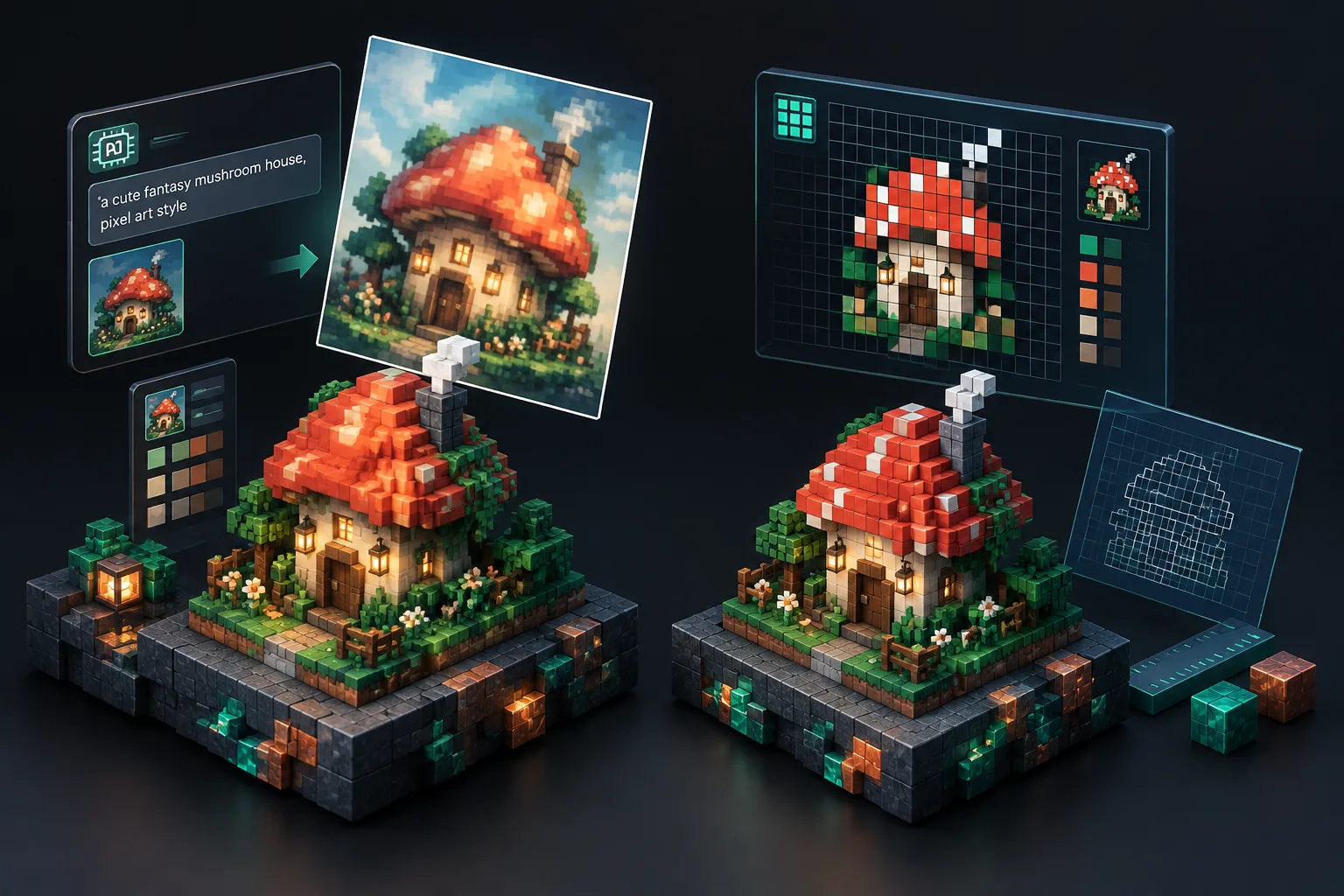
What an AI pixel art generator actually does
Prompt-based tools create raster images. You describe a subject, style, or palette, and the model returns an image. Some add a pixelation filter; others generate small and upscale with nearest-neighbor. The output is still an image, not a block plan. That matters in Minecraft because every build is made of whole blocks. A 32x32 sprite may look clean on screen but still need manual cleanup before it maps to a 32x32 block wall.
Where AI helps
- Moodboards and palette testing before you choose blocks.
- Silhouette ideas for sprites, murals, or banners.
- An AI sprite generator for texture-pack concepts or decorative panels.
- Non-exact art where a few off-grid pixels are acceptable.
Where AI stops being a measuring tool
AI models do not know your world coordinates, your block palette, or whether your circle center is odd or even. They cannot promise the same prompt will produce the same layout. For measured Minecraft work, you need deterministic geometry: the same diameter, height, and style always rebuild the same plan. MinecraftCircle's pixel art generator is a grid tool, not an AI model.
Why Minecraft needs deterministic pixel plans
A Minecraft wall is not a smooth vector shape; it is a stack of cubes. When you use a circle generator, you are asking for a rasterized circle: row runs that approximate a circle with whole blocks. The same logic applies to ovals, spheres, domes, stars, and pixel art.
Odd and even centers
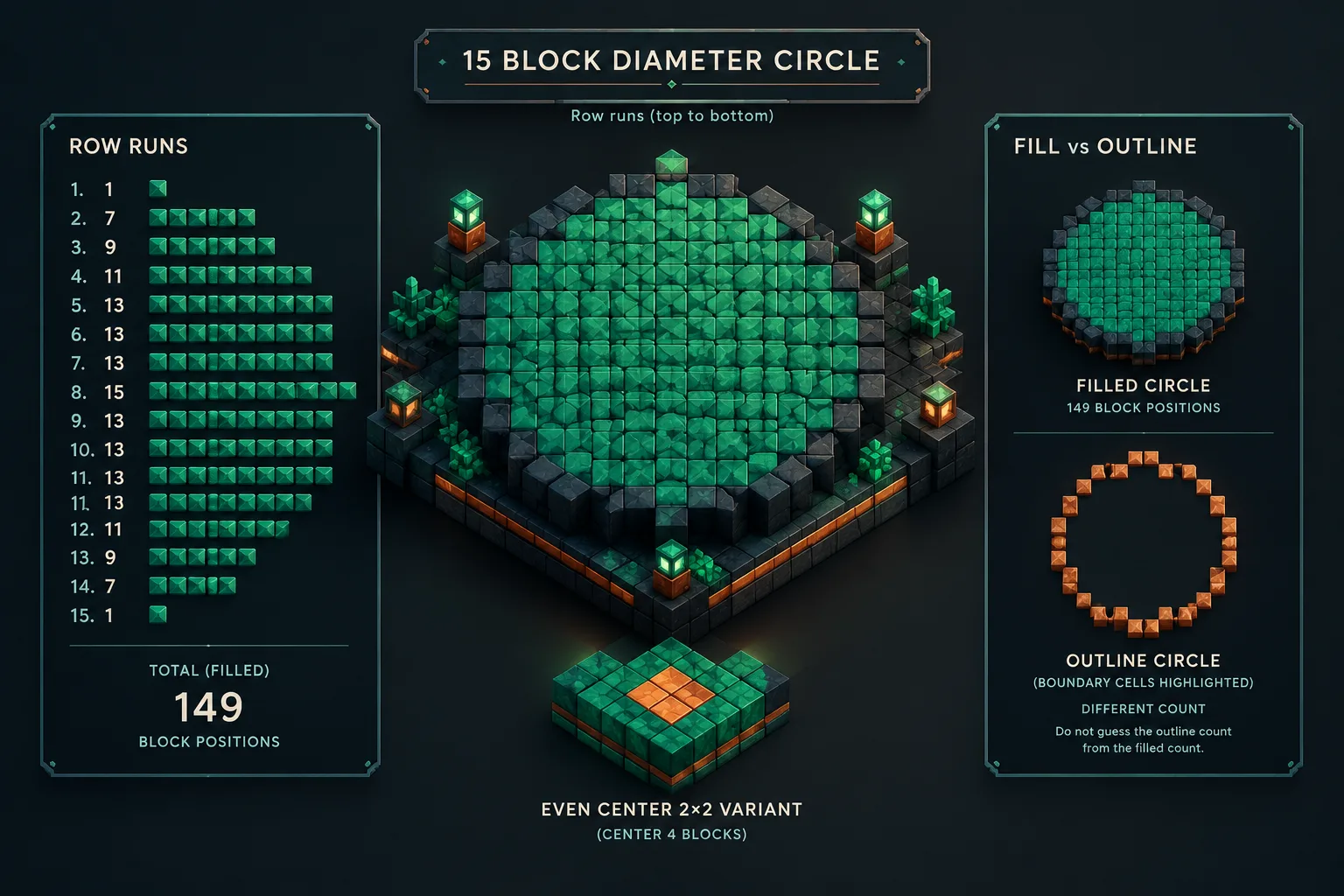
An odd diameter has a single center block. A 15-block diameter circle has a center block at row 0, column 0, a top row of 1 block, and a widest row of 15 blocks. An even diameter has a center point between blocks, so the generator uses a 2x2 center or a consistent offset to keep symmetry. Neither is wrong; they are different grid alignments. Pick one diameter, check the preview, and build to that plan.
Row runs and layers
A row run is a start-and-end pair for one horizontal line of blocks. Instead of listing every block, the plan can say 'row 7: x = -3 to x = 3.' For 3D shapes, the plan is a stack of layers. A sphere is a stack of circular layers; each layer's radius depends on its distance from the equator. A dome is usually the top half of a sphere. A star is a rasterized polygon. A pixel-art plan is a grid where each cell maps to one block. Same settings, same plan.
A measured method: dimensions, layers, row runs, material counts
Measure four things: footprint, height, shell style, and palette. Footprint is diameter or width-by-depth. Height is the number of layers. Shell style tells the generator whether you want solid, hollow, or outline. Palette is the block list you will place.
Worked example: 15-block diameter circle
Set the Minecraft circle generator to diameter 15 and choose a filled circle. The top-to-bottom row widths are 1, 7, 9, 11, 13, 13, 13, 15, 13, 13, 13, 11, 9, 7, 1. That is 149 block positions for a solid fill. If you only want the outline, switch the style to outline. The generator highlights the boundary cells and gives a different count. Do not guess the outline count from the filled count. For a chart-style reference, the circle chart shows the runs in a compact layout.
Dome and sphere layers
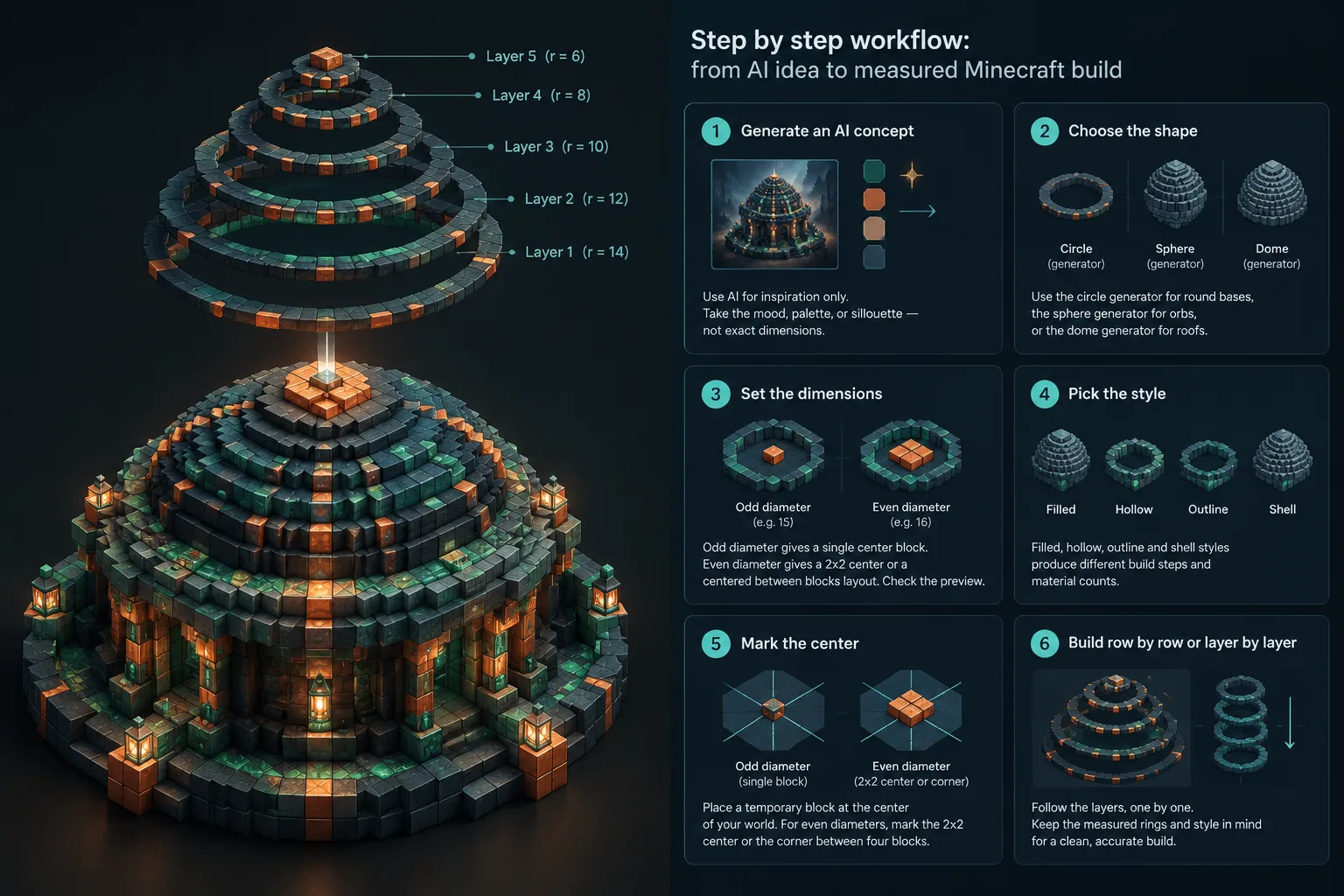
A 15-block diameter dome starts with a base ring near 15 blocks across and shrinks layer by layer toward the top. The dome generator shows each layer as a circle plan. A sphere uses the same layer logic but continues below the equator; the sphere generator is useful for globes and floating islands. For points and corners, the star generator rasterizes the shape as block runs.
Material counts
Material counts are the number of block positions in the plan, not a universal count for every block type. One block type means the count equals the positions. A palette of three blocks means you decide the mix before gathering materials. Always recheck the count after changing diameter, height, or shell style.
Step-by-step workflow: from AI idea to measured Minecraft build
- Generate an AI concept only if you need inspiration. Use it for mood, palette, or silhouette, not exact dimensions.
- Choose the shape. Use the Minecraft circle generator for round bases, the sphere generator for orbs, or the dome generator for roofs.
- Set the dimensions. Odd diameter gives a single center block; even diameter gives a 2x2 center or a centered-between-blocks layout. Check the preview.
- Pick the style. Filled, hollow, outline, and shell styles produce different build steps and material counts.
- Mark the center in your world with a temporary block. For even diameters, mark the 2x2 center or the corner between four blocks.
- Build row by row or layer by layer. For circles, start at the widest row. For domes and spheres, build the base ring first.
- Check symmetry every few rows. Compare your build to the generator preview and correct it early.
- Record the palette. For pixel art, use the pixel art generator to map colors to blocks.
- Export or share. Litematic export is for compatible Java Edition mod workflows. Images, text, CSV, and Markdown work everywhere. Test imports in a copy world.
- Save the settings. Note diameter, height, and style so you can rebuild the same plan later.
For more planning context, see the Minecraft shape generator guide, the pixel art tool guide, and the wiki.
Common mistakes and practical boundaries
Treating AI art as a block grid
AI pixel art may include anti-aliasing, soft shading, or a resolution that does not match your wall. If you place it block by block without a grid map, the result can look blurry. Convert the idea into a fixed grid first.
Ignoring the center type
A 15-block circle plan will not line up with a 16-block base. If your base is even, rebuild the preview for an even diameter. The same rule applies to domes and spheres: the base diameter controls every layer above it.
Forgetting shell versus solid
A filled circle and an outline circle look similar in a small preview but use very different counts. Decide whether you need a solid platform, a hollow ring, or a decorative outline before you gather blocks.
Assuming AI output is deterministic
Prompt-based tools can vary between runs. Deterministic generators do not: same diameter, same style, same plan. Use AI for the idea and math for the measurements.
Skipping the test world
Litematic files are for compatible Java Edition mod workflows. Test the file in a copy world before importing it into a main world. If you play Bedrock Edition or unmodded Java Edition, use the image, text, CSV, or Markdown plan and build manually.
MinecraftCircle is an independent fan-made utility. It is not affiliated with Mojang or Microsoft.
When to use each tool on MinecraftCircle
Use the Minecraft circle generator for round bases, towers, and arenas. Use the circle chart for a compact reference. Use the sphere generator for globes and orbs. Use the dome generator for roofs and greenhouse tops. Use the star generator for decorative stars. Use the pixel art generator for sprites, murals, and pixel panels. If you need a structure to place these shapes into, browse Minecraft house designs.
A simple rule: AI is for 'what could this look like?' and deterministic grids are for 'where does this block go?' The second question is the one Minecraft builds answer.
FAQ
Can an AI pixel art generator make Minecraft pixel art?
Yes, it can create a pixel-style image you use as inspiration. It will not automatically know your block grid, palette, or build dimensions. You still need to convert the image into a measured plan. A grid tool like the pixel art generator is better when you need exact block placement.
Is the MinecraftCircle pixel art generator an AI tool?
No. It is a deterministic grid generator. It does not use prompts or AI image models. You enter dimensions, colors, and styles, and it rebuilds the same block plan every time. That is useful for Minecraft because builds need repeatable row runs and layer counts.
How do I turn AI pixel art into a Minecraft block plan?
Resize or crop the AI image to a fixed grid, such as 32x32 or 64x64. Then map each pixel to the closest block color in your palette. Use the pixel art generator to set the grid size and palette. Check the preview, adjust the colors, and build row by row.
What size should I use for a pixel art generator AI plan?
Choose a size that matches the wall or floor space you have. Small sprites may work at 16x16 or 32x32. Larger murals may need 64x64 or more. If you are building a circle or dome, use an odd diameter for a single center block or an even diameter for a 2x2 center. The Minecraft circle generator can preview both.
Why does my AI pixel art look blurry or off-grid in Minecraft?
AI images often include anti-aliasing, soft shading, or a non-integer pixel grid. When you place those pixels as blocks, the grid does not line up. Reduce the image to a fixed pixel grid, increase contrast, and limit the palette. A deterministic pixel art plan removes the guesswork.
Does the pixel art generator export litematic files?
Litematic export is available for compatible Java Edition mod workflows. Images, text, CSV, and Markdown work everywhere. Test the export in a copy world before using it in a main world, and check the origin and orientation. If you do not use mods, the image and text plans are still enough to build from.
Ready to plan a build? Open the pixel art generator for exact grid maps, or start with the Minecraft circle generator if your project begins with a round base.