Creating a sphere in Minecraft is one of the most interesting challenges in block-based building. Unlike a flat circle, a sphere has to represent a three-dimensional curve using only square blocks. The key to making this work is understanding minecraft sphere layers: horizontal slices that show exactly how wide each part of the sphere should be as it rises or falls.
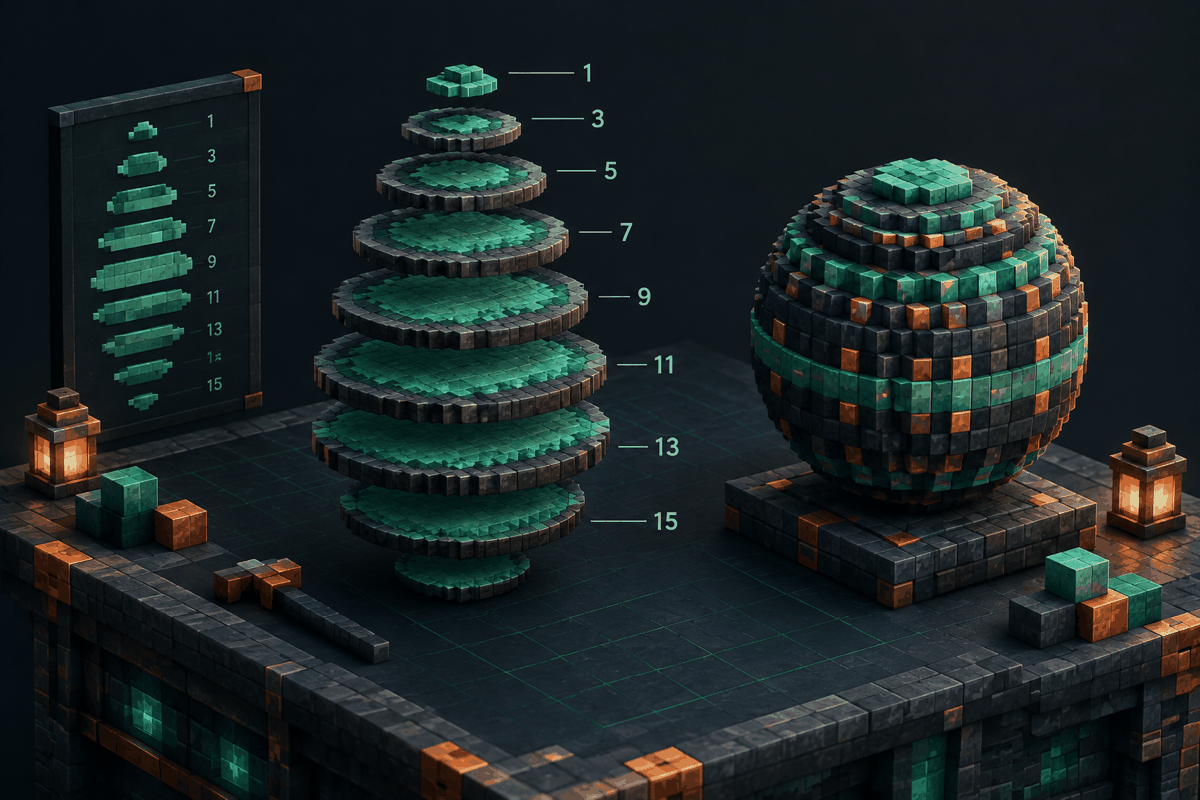
Sphere layers are useful for many different projects, including fantasy towers, futuristic structures, planets, statues, storage rooms, and decorative landscaping. Instead of guessing where blocks should go, builders can follow planned layers to create a balanced shape with consistent symmetry.
What Are Minecraft Sphere Layers?
Minecraft sphere layers are individual horizontal sections of a sphere that show the block arrangement at each height level. Imagine cutting a real sphere into many flat slices. Each slice would create a circle with a different diameter depending on its position.
The middle layers of a sphere are usually the widest because they represent the center of the shape. As you move upward or downward, the layers become smaller until they reach the top and bottom points.
For example, a simple sphere might contain layers like this:
- Top layer: 1 block wide
- Upper layers: gradually increasing widths
- Middle layers: maximum width
- Lower layers: gradually decreasing widths
- Bottom layer: 1 block wide
This method converts a complicated three-dimensional shape into a series of manageable building steps.
Why Layer Planning Matters in Minecraft Builds
Building a sphere without a layer plan often creates uneven curves. Because Minecraft blocks cannot form smooth diagonal lines, small mistakes become more noticeable as the structure grows.
Layer guides help with several important tasks:
Maintaining symmetry
A sphere should look balanced from every angle. Layer-by-layer planning ensures that the left and right sides, as well as the front and back, match correctly.
Scaling large builds
A small sphere can sometimes be built by eye, but large spheres require careful measurements. A 50-block-wide structure contains many repeating patterns that are difficult to manage without a guide.
Reducing building mistakes
Layer plans allow builders to focus on one horizontal section at a time instead of solving the entire shape mentally. This is especially useful when working with survival resources, where replacing misplaced blocks can be expensive.
How Minecraft Sphere Layers Are Calculated
A sphere layer guide is based on the relationship between a sphere's radius and its height. In simple terms, each layer represents a circle created by slicing through the sphere at a specific vertical position.
Builders do not need to calculate complex mathematics manually for most projects. Tools such as a Minecraft sphere generator can create layer patterns automatically, allowing players to select a size and follow the resulting design.
The general process is:
- Choose the desired sphere diameter.
- Determine the number of vertical layers.
- Create a circle pattern for each height level.
- Stack the layers together to form the complete sphere.
The more layers a sphere has, the smoother the final shape usually appears. However, larger designs also require more building time and materials.
Understanding Layer Patterns for Different Sphere Sizes
Different sphere sizes produce different layer sequences. A small decorative sphere might only need a few sections, while a giant build may contain dozens of individual layers.
Small spheres
Small spheres are useful for ornaments, lamps, towers, and compact designs. They are easier to build manually because each layer contains fewer blocks.
Medium spheres
Medium spheres provide a good balance between detail and effort. They are often used for buildings, arenas, and themed structures.
Large spheres
Large spheres can become major landmarks. These projects benefit greatly from a structured layer plan because even a small error can affect the entire appearance.
For builders who also work with related curved designs, a Minecraft circle chart can help understand the smaller two-dimensional patterns that form sphere layers.
Common Uses for Minecraft Sphere Layers
Sphere layers are not only useful for creating simple balls. They can become the foundation for many advanced builds.
Domes and ceilings
A sphere can be divided in half to create a dome. This is useful for observatories, temples, arenas, and futuristic homes. Builders can also explore a dedicated Minecraft dome generator for faster planning.
Planet builds
Large spheres make excellent planets or moons in creative worlds. Layer guides make it easier to add realistic terrain, oceans, and surface details while keeping the overall shape consistent.
Circular rooms
A sphere can be hollowed out to create unique interiors. Players can build underground bases, storage spaces, or themed rooms inside the structure.
Pixel and sculpture projects
Sphere layers are also valuable for statues and pixel-based artwork. Combining planned geometry with color patterns creates more accurate three-dimensional designs.
Tips for Building Better Sphere Layers
Start with a reference size
Before placing blocks, decide the exact width, height, and purpose of the sphere. A decorative object and a functional building require different approaches.
Build from the center outward
Many builders find it easier to mark the center point and expand each layer around it. This helps avoid alignment problems.
Use temporary markers
For large spheres, temporary blocks or guides can show the boundaries of each layer before filling the final material.
Check the shape from multiple angles
A sphere may look correct from one side but uneven from another. Walk around the structure frequently to verify symmetry.
Combine tools with creativity
Generators and charts provide accurate foundations, but they do not limit creativity. Builders can modify materials, colors, interiors, and surrounding landscapes after the main shape is complete.
Minecraft Sphere Layers Compared With Other Shape Guides
Sphere layers are one part of a larger group of Minecraft geometry techniques. Circles, ovals, domes, and other curved structures all use similar ideas: converting mathematical shapes into block patterns.
For example:
- Circles help create foundations and decorative outlines.
- Ovals allow wider or more natural-looking designs.
- Domes create curved roofs and ceilings.
- Spheres create complete three-dimensional forms.
Exploring different shape guides helps builders move beyond simple rectangular structures and create more advanced architecture.
Frequently Asked Questions About Minecraft Sphere Layers
What are minecraft sphere layers used for?
Minecraft sphere layers are used to plan the individual horizontal sections of a sphere. They help players create accurate three-dimensional curves using Minecraft blocks.
How do I make a smooth sphere in Minecraft?
The easiest method is to use a layer-based guide. Start with the smallest top section, gradually expand toward the widest middle layers, then reduce the size toward the bottom.
Can I build a sphere without a generator?
Yes. Experienced builders can manually design layers, but generators and charts save time and reduce measurement errors for larger projects.
Are bigger spheres harder to build?
Large spheres require more planning because they contain more layers and more blocks. A detailed guide makes the process much easier.
Can sphere layers be used for survival builds?
Yes. Layer plans are useful in survival mode because they help estimate materials and reduce wasted resources.
Create Your Own Sphere Layer Plans
Accurate planning makes complex Minecraft builds more enjoyable. Whether you are designing a small decorative object or a massive world landmark, understanding sphere layers gives you a reliable foundation for creating curved structures.
Use the free Minecraft sphere generator from MinecraftCircle to create measured sphere plans and start building with confidence.